

What is Network Equipment? Types, Functions, and Selection Guide
Network equipment refers to essential technological devices that ensure reliable connection, data exchange, and efficient management of internet and local networks between devices. They enable stable internet connectivity, uninterrupted data flow, and the interconnection of various devices.
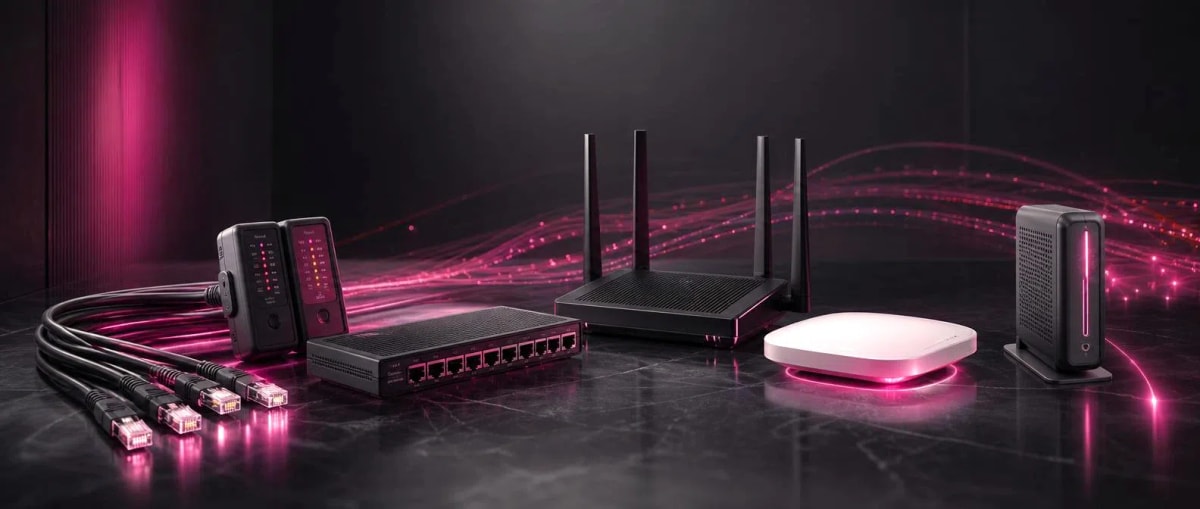
Network equipment includes key components such as network cables, cable testers, signal boosters, routers, access points, and modems. These devices help establish reliable connections between computers, mobile devices, printers, security systems, and other technological hardware. They also support more stable and efficient internet performance.
As the size and purpose of a network change, the number, functions, and technical capabilities of the equipment used also vary. While a simple network structure is sufficient for home users, offices, enterprises, and large facilities require a more extensive and manageable infrastructure. Therefore, understanding the operating principles of network equipment and their interconnections is considered essential for efficient and productive use.
Why is Network Equipment Necessary?
Network equipment consists of physical and software-based tools that facilitate data exchange between computers, phones, printers, and other devices. Without this equipment, it is impossible to connect to the internet, share files, or link devices together. While a minimal set of equipment is enough for connecting a few devices at home, more powerful and multifunctional systems are required for offices and commercial facilities. As the network grows, the number and complexity of the equipment increase, which is why a personalized approach is needed for every project.
In the modern era, almost every home and office is dependent on the internet. Work processes, education, entertainment, and communication are conducted almost entirely online. Therefore, the quality of network infrastructure is not just a matter of convenience, but a crucial factor affecting productivity.
What are Network Cables and What Types Exist?
Network cables provide physical connectivity between devices to enable data transmission. The most commonly used cable types are Ethernet cables, such as Cat5e, Cat6, and Cat6a. The main difference between these cables is their transmission speed and resistance to interference. Cat6 cables are preferred in modern networks because they provide higher speeds and less signal loss. Fiber optic cables are used in projects requiring high-speed transmission over longer distances.
The quality of the cable is often overlooked, but using low-quality cables can lead to frequent disconnections and speed loss in the network. Therefore, it is more efficient to invest in high-quality cable materials for long-term installations. Additionally, proper insulation and protection of cables from environmental factors extend their lifespan.
What are Cable Testers Used For?
A cable tester is an essential tool used to verify whether installed network cables are working correctly. Through this device, it is possible to detect problems such as breaks, short circuits, or incorrect crimping in the cable. Since hundreds of cables are laid in large network projects, manual checking of each one is impractical; therefore, cable testers increase the speed and quality of the installation process.
Professional technicians usually test every cable line after installation to prevent future problems. Some modern cable testers can also measure cable length, which helps in calculating signal loss in advance for long-distance installations. In installations performed without a cable tester, problems are often only discovered during use, which requires additional time and cost.
What Functions Do Signal Boosters Perform?
Signal boosters (repeaters) are devices used to prevent the weakening of internet signals. In large apartments, multi-story houses, or buildings with thick walls, the Wi-Fi signal weakens as it moves away from the router. A signal booster takes the existing signal, re-broadcasts it, and thus expands the coverage area.
These devices are very useful for ensuring stable internet, especially in remote rooms of the house or in garden houses. Some boosters work with mesh network technology, which allows several devices to connect under the same network name, providing a smoother transition. In such systems, the internet connection does not drop when the user moves from room to room, and it automatically connects to the nearest signal source.
How Does a Router Work and Why is it Needed?
A router is a device that receives the internet signal from the modem and distributes it to all devices on the network. Without a router, it would only be possible to connect one device directly to the modem, but thanks to the router, computers, phones, smart TVs, and other devices can connect to the internet simultaneously.
Modern routers not only distribute data but also have firewall functions that ensure network security. When choosing a router, the supported speed standard, number of antennas, and coverage area should be considered. Additionally, some routers allow prioritizing certain applications or devices with a feature called Quality of Service. This is especially useful for users who play online games or for whom video quality is important.
Regularly updating router firmware is also an important issue. Outdated firmware can create security vulnerabilities, so it is recommended to follow the updates provided by the manufacturer.
How Does an Access Point Differ from a Router?
An Access Point is a device that connects to an existing wired network to create a Wi-Fi signal in that area. Unlike a router, an Access Point usually does not perform routing functions on its own; it simply provides wireless connectivity.
For this reason, in large offices, warehouses, or spaces with a large number of users, several Access Points are installed to ensure an even and strong Wi-Fi signal throughout the area. Access Points are more effective when used in conjunction with centralized network management. Many modern Access Point models have a cloud-based management panel, which allows monitoring and configuring several points simultaneously. This is very convenient for companies with branch networks, as all points can be managed from a central location.
What is the Function of a Modem?
A modem is a device that converts the signal from the internet provider into a format understood by the computer network. Simply put, the modem is the first link connecting your home or office to the internet provider.
In some cases, the modem and router are combined into one device. This simplifies installation. However, using separate modems and routers usually creates higher performance and more flexible configuration options. The type of modem may vary depending on the internet provider; for example, an ONT device is used for fiber internet, and a cable modem is used for cable internet. When choosing a modem, it is important to check compatibility with the provider's requirements; otherwise, there is a risk of being unable to establish a connection.
What Should Be Considered When Choosing Network Equipment?
When buying network equipment, the purpose of use should be determined first. A simple router may be enough for home use, but Access Points and strong cable infrastructure are required for offices or commercial areas.
Also, the speed supported by the equipment, coverage area, the number of devices it can support simultaneously, and security features should be taken into account. High-quality cables and properly tested infrastructure prevent problems in long-term use and help save on additional costs. When planning a budget, not only the initial purchase cost but also future maintenance needs should be considered. Although low-quality equipment may seem more affordable in the short term, it can cause more problems and costs in the long run.
What Does the Future of Network Infrastructure Look Like?
With the development of technology, network equipment is constantly improving. Wi-Fi standards are being updated to provide higher speeds and support for more devices. Mesh network systems are becoming more widespread because they provide smoother and more manageable coverage compared to traditional boosters.
At the same time, the increasing number of smart devices in homes increases the load on the network. Therefore, more powerful routers, more flexible Access Point systems, and faster cable infrastructure will be required in the future. Keeping track of these developments and updating equipment over time is an essential condition for the stable operation of the network.
Conclusion
Network equipment, such as routers, modems, Access Points, cables, cable testers, and signal boosters, forms the foundation of modern digital life. Although each piece of equipment has its own function, their joint and correct operation creates a fast, stable, and secure internet experience. When building a network for a home or office, choosing quality equipment that suits your needs will minimize future technical problems. Choosing network equipment according to your needs helps create a more stable internet connection and long-term ease of use.
Comments0
Be the first to comment
Share your thoughts on this article