

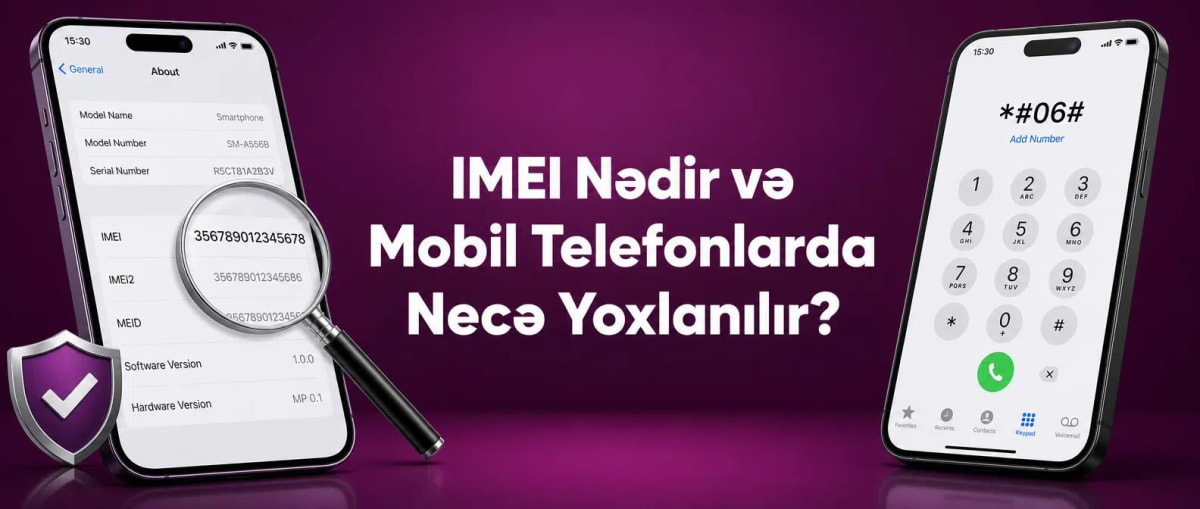
What is IMEI and How to Check It on Mobile Phones?
When buying mobile phones, it is not enough to pay attention only to technical specifications such as screen, camera, memory, and battery. Ensuring the device's identification information is correct is also an important part of the purchasing process. One of the most commonly used indicators among this information is the IMEI number.
IMEI is a unique identification code used to identify a mobile device. This information is especially important for new and second-hand phones, devices brought from abroad, and during checks related to mobile communications. Comparing the code shown on the device with the model and serial number before buying a phone can help prevent potential problems.
This article answers key questions such as what is IMEI, how to check IMEI, where to find this code, what is IMEI registration, and how to check the registration status.
Check IMEI on the Customs website: https://e.customs.gov.az/cabinet/check-imei
What is IMEI?
IMEI is a unique identification number used to identify mobile phones and other compatible communication devices. The acronym IMEI stands for International Mobile Equipment Identity and usually consists of 15 digits.
This code is not the same concept as a phone number. A phone number is linked to a SIM card and a mobile line, while an IMEI identifies the specific device.
Simply put:
The phone number identifies the mobile line, while the IMEI identifies the device itself.
This distinction is especially important when buying a used mobile phone.
What is This Identification Code Used For?
The device's identification number can be used for various purposes. When buying a phone, it acts as one of the indicators that help verify information about the device.
The main areas of use are:
identification of the mobile device;
comparison of device information;
researching second-hand phones;
checking registration status;
certain procedures related to mobile communications;
some processes related to lost or stolen devices.
However, just knowing this code does not mean that all information about the phone is automatically obtained. The results depend on the information provided by the official or relevant service used.
Where to Find the Phone's IMEI Number?
There are several ways to find a mobile device's identification number. The fastest option is to use a special code.
How to check IMEI with *#06#?
Open the phone's dialer app and dial:
*#06#
If the device supports this function, the identification information will appear on the screen. In Dual SIM models, it is possible for two separate codes to be displayed.
How to find the device code from settings?
It is also possible to obtain the information from the phone's settings. For example, on Samsung Galaxy devices, usually:
Settings → About phone
When you enter the section, information such as IMEI, model, and serial number appears.
Menu names may vary depending on the model and software version.
Where is the IMEI on the box?
The identification code is also noted on the original packaging of some mobile phones. It is useful to compare the information on the box with the indicator shown on the device itself.
If the information from the two sources does not match, it is not recommended to buy the phone without clarifying the reason.
How to Check the Device's Identification Information?
In the first stage of the verification process, it is necessary to determine the correct identification number of the phone. For this, you can use the *#06# code or the device's settings.
Then, you can compare the obtained information with:
the code shown on the phone itself;
the indicator on the packaging;
the model and serial number;
information in relevant official electronic services.
Such an approach creates an additional verification stage, especially when buying a used device.
What is IMEI Registration?
IMEI registration is the process of registering a mobile device's identification information in the relevant system.
This issue requires attention, especially for phones brought from abroad and the buying/selling of second-hand devices. Checking the registration status of a device to be used in Azerbaijan in advance can help prevent problems that may arise later.
Since rules and electronic services related to registration can change over time, it is more appropriate to refer to official government sources for up-to-date information.
How to Check the Phone's Registration Status?
To find out whether a device is registered in the system, you must first determine its identification number. Then, it is possible to check the relevant information through the official electronic service intended for this in Azerbaijan.
Especially if you are buying a second-hand phone, it is more appropriate to carry out this process before purchasing.
Why is it Important to Check IMEI Registration?
Special attention should be paid to the registration issue for devices brought from abroad and used devices.
For example, when buying a mobile phone belonging to brands like Samsung Galaxy, Xiaomi, HONOR, and others, it is not enough to just look at whether the device is in working order. Its identification information and registration status should also be reviewed.
This allows for a more comprehensive evaluation of the purchasing decision.
What Checks Should Be Performed When Buying a Second-Hand Phone?
Points to consider when buying a second-hand phone are not limited to the device's appearance. The phone's identification number, registration status, and technical specifications should be evaluated together. Especially when choosing a used mobile phone, checking the accuracy of the IMEI information can help prevent problems that may arise later.
Before making a purchase decision, it is recommended to perform the following checks:
Determine the IMEI number with the *#06# code.
Compare the information shown in the settings with the indicator on the device.
Check if the IMEI noted on the box matches the phone.
If it is a Dual SIM model, look at both IMEI numbers.
Research the device's registration status in the official electronic service.
Confirm the compatibility of model and serial numbers.
Test the screen, camera, battery, charging port, speaker, and other main functions.
If a discrepancy is detected between the information, it is not correct to buy a second-hand phone without clarifying the reason. These checks help to evaluate the real condition of the device and make a more reliable choice.
What Does Two IMEIs Mean?
It is normal for mobile phones with Dual SIM support to have two separate IMEI numbers. In this case, two identification codes, usually as IMEI 1 and IMEI 2, are shown on the device.
This situation is related to the phone working with two SIM lines and does not indicate a problem on its own.
Therefore, when buying a dual-SIM device, it is more appropriate to consider both codes, not just one indicator.
What is the Difference Between IMEI and Serial Number?
IMEI and serial number are different identification information.
IMEI is device information related to the mobile device's identification and the mobile network.
Serial number is an indicator given by the manufacturer to distinguish a specific product.
Both pieces of information can be shown in the phone's settings. When buying a second-hand device, it is useful to check their compatibility with model information.
Is it Possible to Determine if a Phone is Original with IMEI?
It is not possible to determine that a phone is completely original based solely on this code.
When evaluating the authenticity of the device, additionally:
model number;
serial number;
software;
interface;
technical features;
physical structure;
camera and other functions
should be reviewed.
Therefore, checking the identification number is only one part of the overall inspection of the phone.
What Mistakes Should Be Avoided During Inspection?
One of the most common mistakes is looking only at the existence of the code. The main goal is to determine whether the information shown in various sources matches each other.
When buying a phone:
compare the information on the device and the box;
check both codes in dual-SIM models;
research the registration status;
compare the model and serial number;
evaluate the physical condition of the used device;
do not rely on only one inspection result.
Frequently Asked Questions About IMEI
How many digits does an IMEI consist of?
IMEI is usually a 15-digit identification code.
What is the easiest way to find the IMEI?
Dialing the *#06# code in the dialer app is one of the simplest methods. Alternatively, it is possible to find this information from the device's settings.
Why is it necessary to check IMEI?
This process allows you to compare the device's identification information and perform an additional check, especially when buying a second-hand phone.
How to check IMEI registration?
First, you need to find out the device's identification number, then use the official electronic service intended for this in Azerbaijan.
Is it important to check the registration status?
It is appropriate to research this information in advance, especially for devices brought from abroad and used devices.
Is it normal to have two IMEIs?
Yes. It is normal for devices with Dual SIM support to have two separate identification codes.
Is it possible to know if a phone is original with IMEI?
No. This information helps with device identification, but it does not confirm the phone's originality on its own.
Is IMEI a phone number?
No. A phone number is related to the mobile line, while an IMEI is related to the device itself.
Conclusion
IMEI is one of the main identification pieces of information for a mobile phone and it is useful to review it when buying a device. Especially for second-hand and phones brought from abroad, it is a more correct approach to evaluate this indicator, registration status, model, and serial information together.
It is possible to find the information via the *#06# code, the phone's settings, and in some cases, on the packaging. However, relying only on this indicator is not correct. For a more reliable choice, the device's identification information, registration status, technical and physical condition, as well as the sale price should be evaluated together.
You can check the mobile phone category on TenderYard to consider different brand, model, and price options.
Comments0
Be the first to comment
Share your thoughts on this article