

Detailed information about computer mice
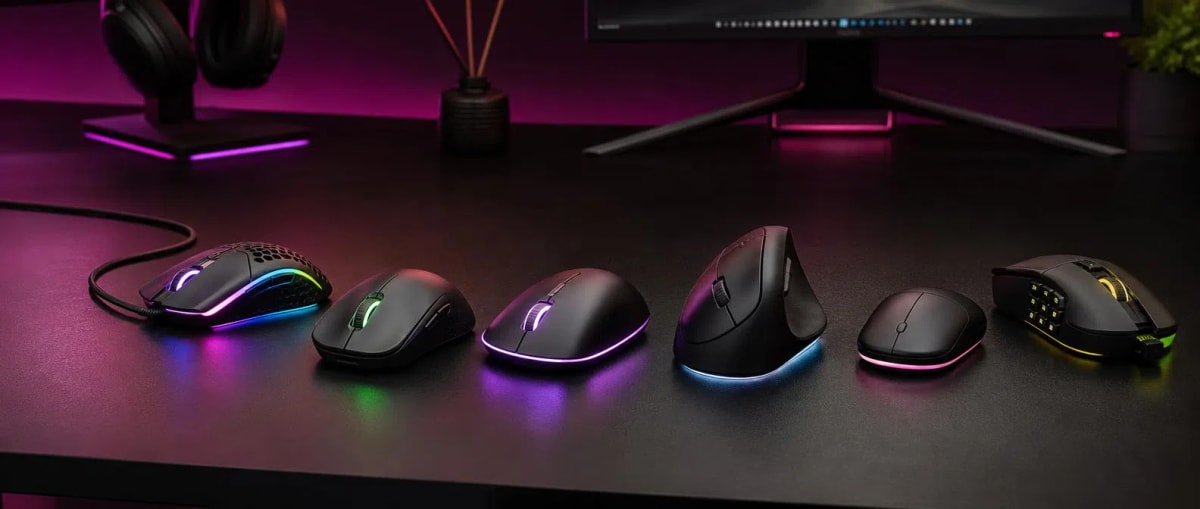
Computer mice are one of the most commonly used input devices when working with desktop computers and laptops. Through the mouse, the cursor is controlled, files are selected, programs are opened, and navigating web pages becomes more convenient. This article provides general information about computer mice, covering the structure of various models, sensor types, connection methods, number of buttons, and usage features.
The market offers wired and wireless mice, optical sensor models, compact mice, devices designed for office use, and gaming mouse variants. Since each model is adapted to different usage needs, it is necessary to pay attention not only to the price but also to the purpose of use, ergonomic structure, sensor specifications, connection type, and additional functions when choosing.
This guide provides information on types of computer mice, sensor technologies, differences between wired and wireless connections, DPI indicators, number of buttons, ergonomics, and suitable choices for various usage purposes. The purpose of the article is not to recommend a specific product, but to help better understand the key points to consider when choosing a computer mouse.
What are the types of computer mice?
Computer mice are mainly distinguished by their connection method, sensor technology, and purpose of use. The most common variants are wired and wireless models. Wired mice are usually connected to the computer via USB and do not require a separate power source. Wireless models mainly work via a 2.4G USB receiver or Bluetooth.
In terms of sensors, optical models are widely used for daily tasks. Laser sensor mice can offer higher sensitivity capabilities and are used in some gaming models.
The purpose of use also affects the choice. A simple mouse may be sufficient for office work. For gaming, additional buttons, a flexible sensor, and polling rate come to the fore. Portability is also important for laptop users.
What is the difference between optical and laser mice?
The main difference between an optical and a laser mouse is the sensor technology used to determine movement. Optical models use an LED light and an image-based sensor system to track surface movement. These types of sensors are widely used in daily computer use and can provide sufficiently accurate control for various tasks.
Laser sensors use laser light to track the surface. They can offer high sensitivity and are applied in some special, especially gaming-oriented models. However, the presence of a laser sensor does not automatically mean that the mouse is better for all users.
For regular office work, internet browsing, and working with documents, a high-quality optical mouse is usually sufficient. In gaming and usage scenarios requiring more precise movement, the overall quality of the sensor, DPI range, and other technical features should be evaluated together. Therefore, it is more correct to look at real usage needs when choosing.
How does a wireless mouse work?
A wireless mouse works without cables, establishing a radio or Bluetooth connection with the computer. In 2.4G models, a small USB receiver is plugged into the computer, and the mouse transmits data through that receiver. In Bluetooth models, a direct wireless connection is established with a compatible device, and no separate USB receiver is required.
The main advantage of a wireless mouse is the absence of cable restrictions. This feature can be convenient for laptop users and those who carry the device frequently. On the other hand, energy issues must be considered in wireless models.
Battery life varies depending on the model and intensity of use. Some models can last 20–30 hours, while others can last for several months. Therefore, it is useful to consider how the power source is used.
What is DPI and how does it affect the mouse?
DPI, or Dots Per Inch, is the sensitivity indicator of the mouse. Simply put, as DPI increases, the cursor travels a greater distance on the screen when the mouse is moved the same distance. Lower DPI can provide slower, but for some users, more controlled movement.
For daily use, the 800–1600 DPI range is sufficient for many users. Very high DPI is not required for browsing the internet, working with documents, and using office programs.
In gaming mouse models, it is possible to encounter 3000 DPI and higher indicators. However, high DPI does not necessarily mean a better result. Gamers sometimes choose lower sensitivity to increase accuracy. Therefore, DPI should not be looked at alone, but together with the quality of the sensor and adjustment capabilities.
What is important when choosing an office mouse?
An office mouse is mainly chosen for working with documents, using the internet, managing spreadsheets, and daily computer tasks. In such a model, a comfortable shape, stable operation, and precise cursor control may be more important than a large number of additional functions.
First of all, the basic size of the mouse should fit your hand. An excessively small or large model can cause discomfort during long-term use. Comfortable button pressing and the correct placement of the scroll wheel also affect daily use.
Both wired and wireless models can be suitable for the office. Wired devices do not need batteries. Wireless models eliminate cable clutter and help the desk look tidier. When choosing between Bluetooth and a 2.4G receiver, the number of ports on the computer and usage habits should be considered.
When choosing a mouse for office work, it is more appropriate to prioritize the comfort of the device that will be used every day, rather than just technical specifications.
How does a gaming mouse differ from a regular mouse?
A gaming mouse can be equipped with additional features for faster and more precise control in games. Compared to a regular mouse, there are models that offer wider DPI adjustment, high polling rate, additional buttons, and programming capabilities.
Polling rate indicates the frequency at which the mouse transmits data to the computer and is measured in Hz. As the indicator increases, the position of the mouse can be reported to the computer more frequently. This feature is taken into account in fast-paced games.
Programmable buttons allow you to assign certain commands directly to the additional buttons on the mouse. This can create convenience for the user in some game genres. Shape and weight are also important issues in gaming models, as grip comfort can affect control during long gaming sessions.
However, a non-gaming user may not need such features. Therefore, the choice of a gaming mouse should be based on the real purpose of use, not just high indicators.
In addition to peripheral devices for gaming, system performance is also important. For more information on this topic, you can check the gaming laptops guide.
How should a mouse for a laptop be chosen?
When choosing a mouse for a laptop, size, weight, connection type, and portability are criteria. A user who frequently carries their laptop may prefer a compact model that takes up little space in the bag. However, an excessively small mouse is not comfortable for everyone.
Bluetooth connection is one of the practical choices for a laptop because it does not require a separate USB receiver. 2.4G wireless models are also convenient, but their USB receiver connects to the computer. This difference can be more significant for laptops with limited USB ports.
If a wireless model is chosen, the battery or accumulator issue should also be considered. The device's energy indicator, charging method, and usage duration can affect daily convenience.
When buying a mouse for a laptop, it is necessary to pay attention not only to the convenience of carrying but also to how the hand is positioned during long-term use. Finding the right balance between portability and ergonomics creates a better choice.
What do mouse prices depend on?
Mouse prices vary depending on several key factors. These include connection type, sensor technology, material, number of buttons, DPI adjustment, wireless operation capabilities, and additional software functions. Therefore, even if two mice look similar, their prices may be different.
Simple wired office models usually have fewer functions. In wireless models, the connection and power system create additional features. In gaming mice, high polling rate, additional programmable buttons, and wider adjustment capabilities can affect the price.
When comparing mouse prices, it is not correct to look only at the number. Paying more for functions that the user does not need may not have a practical benefit. Conversely, for long-term daily use, a comfortable shape and quality construction may be more important.
Therefore, when buying a mouse, the purpose of use should first be determined, and then the features required for that purpose should be compared.
How should a mouse be used correctly?
Correct use of the mouse is important for maintaining comfort. The mouse should not be held too tightly, and the wrist should be kept in a natural position as much as possible. Placing the arm comfortably on the table and keeping the shoulders relaxed can increase comfort during long-term work.
It is also useful for people who work in front of a computer for a long time to take breaks. Moving the hand and wrist during breaks and not staying in the same position for a long time can support daily usage comfort. If persistent and strong pain occurs, it is better to seek professional advice instead of just attributing it to the mouse.
During maintenance, the surface and sliding parts of the mouse should be kept clean. Dust accumulation in the sensor area can affect tracking quality. During cleaning, it is necessary to prevent liquid from entering the electronic parts.
Checking the status of the battery or accumulator in wireless models is also part of good usage habits.
What mistakes are made when buying a computer mouse?
One of the most common mistakes when buying a computer mouse is relying only on price. Just as a cheap model is not always a bad choice, an expensive device is not the most suitable option for every user. The choice should be made according to the purpose of use and daily needs.
Another mistake is looking only at the DPI indicator. High DPI does not automatically mean that the mouse is of higher quality. Sensor accuracy, shape, and ease of use should also be considered.
When choosing a wireless model, not considering battery life and connection method can also cause problems. The difference between Bluetooth and 2.4G should be evaluated according to the user's computer and work style.
When buying a gaming mouse, it is not correct to focus only on the number of additional buttons. Polling rate, sensor, shape, weight, and programming capabilities should be considered together.
What questions are asked about computer mice?
Does a wireless mouse cause lag?
In modern wireless models, lag depends on the connection technology used and the specific device. In daily office and internet use, this is usually not a major problem. For gaming, polling rate and connection features should be looked at separately.
Should a Bluetooth or 2.4G mouse be chosen?
Both connections have advantages. Bluetooth does not require a separate USB receiver. A 2.4G model works with a USB receiver and requires a suitable port on the computer. The choice depends on the device's capabilities and usage conditions.
Does high DPI mean a better mouse?
No. DPI only indicates sensitivity. A high indicator can provide faster cursor movement, but it is not a superior choice for all users.
Is it necessary to buy a gaming mouse for the office?
For most office users, this is not necessary. A comfortable shape, correct sensor, and reliable connection can be sufficient for daily work. Gaming functions are only useful if those capabilities will be used.
What should be looked at first when choosing a mouse?
First, the purpose of use should be determined. Then, size, shape, connection, sensor, DPI, number of buttons, and battery life in wireless models can be compared.
What should be remembered when choosing computer mice?
When choosing between computer mice, there is no model that is equally suitable for all users. Different features may be more important for office work, daily internet use, working with a laptop, and gaming. Therefore, it is necessary to first determine the purpose of use.
For daily tasks, a comfortable optical sensor model may be sufficient. For those who do not want cables, a wireless mouse, for those looking for portability, a compact model, and for gaming users, a suitable sensor, polling rate, and programmable buttons may be more appropriate.
When comparing mouse prices, it is important to strike a balance between the functions offered by the device and real needs. A mouse that is comfortable and practical in daily use is a better choice than a model with the highest DPI indicator.
Comments0
Be the first to comment
Share your thoughts on this article