

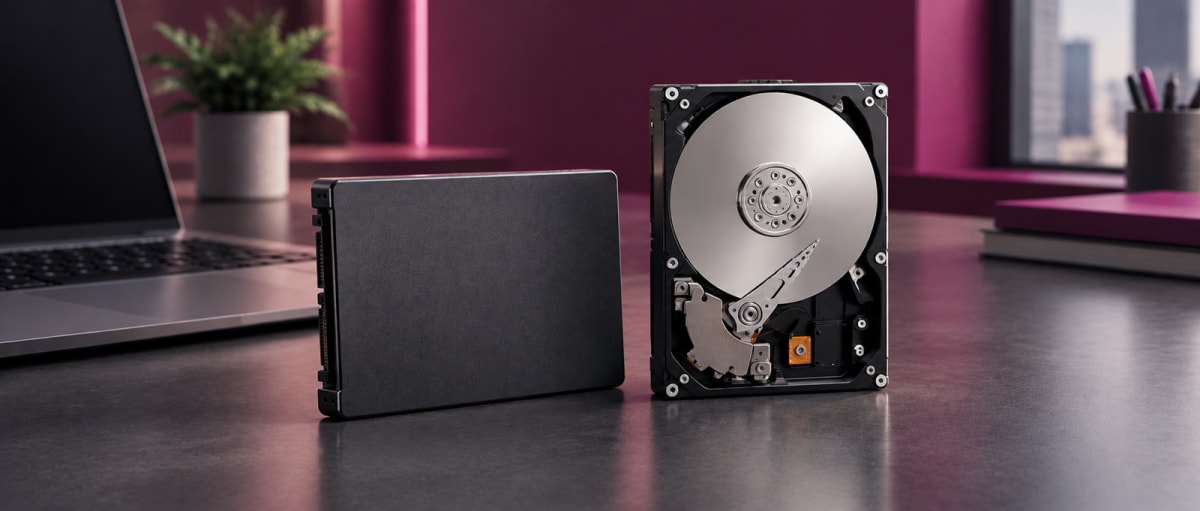
Difference Between SSD and HDD: Which One Should You Choose?
The difference between SSD and HDD is one of the main issues to consider when choosing a computer or laptop. Both types of disks are used to store files, programs, and the operating system, but they differ in terms of operating principle, speed, price, capacity, and durability.
SSDs are distinguished by their fast performance and short boot times in modern devices. HDDs, on the other hand, can have an advantage by offering larger storage capacity at a relatively affordable price. Therefore, the answer to the question is SSD better than HDD depends on the user's needs and budget.
In this article, we will explain what SSD and HDD are, their main differences, advantages, and disadvantages, and compare which type of disk is more suitable for different purposes.
What is an SSD?
What is an SSD? An SSD (Solid State Drive) is a modern storage device that stores data on memory chips. Unlike an HDD, an SSD does not have a rotating mechanical disk or a moving head to read data inside. Data is stored on electronic memory chips, and this structure allows the disk to work faster.
One of the main advantages of an SSD is its high SSD speed. The operating system boots faster, programs load more quickly, and waiting times when accessing files are reduced. This difference is especially noticeable during daily use of laptops and computers.
SSDs are available in various capacities. 256 GB and 512 GB models may be sufficient for daily use, while users working with larger files may prefer 1 TB or higher capacity models.
Since SSDs do not have mechanical parts, they can also be more resistant to shock and vibration compared to HDDs.
What is an HDD?
What is an HDD? HDD (Hard Disk Drive) is a storage device that stores data on rotating disks coated with magnetic material. Inside the disk, there is a moving mechanical head for reading and writing data.
The HDD has been one of the primary storage devices in computers for many years and has been widely used to store large amounts of data. One of its main advantages is that it offers high HDD capacity at a relatively affordable price.
For example, for a user who wants to store large volumes of data such as photos, videos, documents, and backups, an HDD can be a practical choice. However, due to its mechanical structure, an HDD does not provide as fast access to data as an SSD.
Since HDDs have moving parts, they can be more sensitive to strong shock and vibration. Therefore, they require extra care, especially when used in portable devices.
Main Differences Between SSD and HDD
The difference between SSD and HDD is mainly reflected in features such as speed, price, durability, noise, power consumption, and storage capacity. Although both disks are designed to store data, their user experience is not the same because their technology is different.
Speed Difference
SSDs provide faster access to data. When booting the operating system, loading programs, and reading files, an SSD offers a faster experience to the user.
In an HDD, the movement of mechanical parts increases the access time to data. Therefore, a device equipped with an SSD usually feels more responsive during daily use.
Price Difference
When comparing the same storage capacity, an HDD is usually more affordable. Especially for users who need large storage capacity, an HDD can be superior in terms of price.
The price of SSDs can be higher depending on capacity and technology. Nevertheless, for users who need high speed, the extra cost of an SSD can be a justified choice.
Durability and Lifespan
Since there are no moving mechanical parts in an SSD, it can be more resistant to physical shock. This feature is especially important for laptops.
In an HDD, since there are rotating disks and a moving head, physical shocks can create certain risks. However, the lifespan of both types of disks depends on usage conditions, write intensity, and the technical condition of the device.
Noise and Heat
Since SSDs do not have mechanical parts, they practically do not create noise while working. They also usually generate less heat and can be efficient in terms of power consumption.
An HDD can create some noise while working due to rotating mechanical parts. When working for a long time, heat and power consumption can also be higher compared to an SSD.
Storage Capacity
HDDs are distinguished by offering large storage capacity at a more affordable price. Therefore, they can be convenient for storing archives, photos, videos, and backups.
High-capacity models are also available in SSDs, but the price of large-capacity SSDs is usually higher.
Advantages and Disadvantages of SSD
The main advantage of an SSD is its fast performance. Since the operating system, programs, and files load faster, the computer and laptop react more quickly during daily use.
Main advantages of SSD:
high data read and write speed;
faster operating system boot;
faster program loading;
silent operation;
no mechanical parts;
higher resistance to shock and vibration;
relatively low power consumption.
However, an SSD also has some disadvantages. Compared to the same capacity, the price can be higher than an HDD. Especially for a user who wants to store large amounts of data, buying a high-capacity SSD can be more expensive.
Therefore, when choosing an SSD, it is necessary to pay attention not only to speed but also to the required storage capacity and budget.
Advantages and Disadvantages of HDD
The main advantage of an HDD is the ability to store large amounts of data at a relatively low price. For this reason, it is still used for storing archives, backups, and large media files.
Main advantages of HDD:
large storage capacity;
more affordable price compared to an SSD of the same capacity;
convenient for archives and backups;
a practical choice for storing large volumes of data.
Disadvantages include lower speed, the presence of mechanical parts, noise during operation, and higher sensitivity to physical shock.
When an HDD is used as the main system disk, booting the computer and loading programs can take longer compared to an SSD. Therefore, if speed is the main priority, an SSD is considered a more suitable choice.
SSD and HDD Comparison Table
The table below shows the difference between SSD and HDD more clearly based on key features:
Feature | SSD | HDD |
Speed | High | Lower |
Price | Can be higher | More affordable |
Durability | Higher | More sensitive due to mechanical parts |
Noise | Silent | Can create mechanical noise |
Capacity | Various capacities available | More cost-effective in large capacities |
Usage Area | System, programs, games, daily use | Archives, backups, and large volumes of data |
As seen from this comparison, an SSD can have an advantage in terms of speed and responsiveness, while an HDD can have an advantage in terms of large storage capacity and price.
Which Disk is Suitable for Which User?
Which type of disk should be chosen? For this, first of all, it is necessary to determine the purpose for which the device will be used. The requirements of a user who needs speed are not the same as those of a user who stores large amounts of data.
For Gamers
Fast loading and responsive system performance are important in games. Therefore, an SSD is a more suitable choice for gaming. An SSD can reduce the opening and loading times of games. However, overall gaming performance is affected not only by the disk but also by the processor, video card, and RAM.
For Business and Office Users
For working with documents, internet usage, video conferencing, and daily programs, an SSD provides a more comfortable user experience. Especially the fast opening of the operating system and programs makes the work process more efficient.
For Those Engaged in Video and Photo Editing
Users working with video and photo files may need both fast storage and sufficiently large capacity. Using an SSD for storing active projects and an additional HDD for storing large archives can be a practical solution.
For Those Storing Large Files
For users who store many photos, videos, documents, and backups, an HDD is a convenient choice due to its large capacity and affordable price. The main goal here is to store large amounts of data cost-effectively rather than high speed.
Frequently Asked Questions
How many years does an SSD last?
It is not possible to determine the exact lifespan of an SSD in advance. This period depends on the quality of the memory, write intensity, and usage conditions. With normal use, an SSD can work for many years.
Is it worth switching from HDD to SSD?
If a computer or laptop is running slowly due to an HDD, switching to an SSD can create a noticeable increase in speed. The operating system and programs open faster.
Is it possible to change the SSD in a laptop?
In some laptop models, it is possible to change or upgrade the SSD. However, this depends on the device model and the memory interface it uses. Therefore, it is necessary to check the technical specifications of the device before making changes.
Is an SSD more reliable than an HDD?
Since there are no moving mechanical parts in an SSD, it can be more resistant to physical shock than an HDD. However, no storage device is completely risk-free against data loss. It is recommended to keep backups of important data.
Can SSD and HDD be used together?
Yes. It is possible to use both disks in a computer. For example, an SSD can be used for the operating system and programs, and an HDD can be used for large files and archives.
Conclusion: SSD or HDD?
The difference between SSD and HDD is mainly reflected in speed, price, storage capacity, durability, and purpose of use. Since an SSD works faster and silently, it is a more convenient choice for the operating system, programs, games, and daily use.
An HDD can be practical for users who want to store large amounts of data at a more affordable price. Especially for archives and backups, an HDD is still a useful choice.
If the main goal is for the computer or laptop to work faster, it is more appropriate to choose an SSD. If large storage capacity is the main priority and the budget is limited, an HDD can be considered. In some cases, the most practical solution is to use an SSD and HDD together.
Ultimately, there is no universal answer to the question is SSD better than HDD. The right choice should be determined based on the purpose of use, required storage capacity, and budget.
Comments0
Be the first to comment
Share your thoughts on this article